When you first activate Alibaba Cloud Model Studio (Singapore region), the platform automatically grants you a free quota for various models.
Only models in the Singapore region with the service deployment scope set to International are eligible for a free quota. Models in other regions or with different service scopes are not eligible.
Rules
Validity period
The free quota is valid for 90 days, starting from the date you activate Alibaba Cloud Model Studio, the model is released, or your model request is approved (whichever is later). After the quota expires or is exhausted, you will be charged for continued use of the model inference service.
Starting from 03:00 UTC on September 8, users who activate Alibaba Cloud Model Studio for the first time will receive a free quota that is valid for 90 days. This change does not affect users who activated the service before this date. For more information, see the Notice on Validity Period Adjustment for Alibaba Cloud Model Studio Free Quota.
Once the free quota expires, it automatically becomes invalid regardless of whether it has been fully used. Specifically:
-
The free quota countdown is not paused by inactivity — unused quota still expires when the validity period ends.
-
After expiry, any remaining quota is automatically voided and will not be reissued or extended.
-
Re-registering a new account does not grant an additional new user free quota.
Scope
The free quota only covers charges for real-time inference (invocations). It does not apply to the following scenarios:
-
Custom models (fine-tuned or deployed models)
-
PAI-DSW
-
OSS storage and request fees
Notes
An Alibaba Cloud account and its RAM users share a single free quota.
For example, if the total free quota for qwen-max is 1,000,000 tokens, and the Alibaba Cloud account uses 100,000 tokens while a RAM user uses 200,000 tokens, the remaining free quota for qwen-max is 700,000 tokens.
Free quota is independent per model and cannot be shared across models. Specifically:
-
Each model (such as qwen-plus, qwen3.6-plus, or qwen3.6-plus-2026-04-02) has its own independent free quota (typically 1,000,000 tokens). Quota cannot be merged or transferred across models.
-
A snapshot version with a date suffix (for example, qwen3.7-max-2026-05-17) and the latest version without a date suffix (for example, qwen3.7-max) are treated as two independent models, each with its own free quota.
-
When one model's free quota is exhausted, the system does not automatically switch to another model that still has quota. You must manually update the
modelparameter in your code or tool configuration to specify a different model.
Get your free quota
Visit Alibaba Cloud Model Studio - Singapore. After reading and agreeing to the service agreement, the system automatically activates Alibaba Cloud Model Studio and grants you a free quota (The free quota is available only in the Singapore region).
If the service agreement does not appear, it means you have already activated Alibaba Cloud Model Studio and received a free quota.
After you activate the service, it may take some time for your free quota to take effect — typically up to two hours. If you do not see your quota immediately after activation, wait and check again later. In the model list, models that have a free quota are marked with a blue quota bar.
The first time you activate Alibaba Cloud Model Studio, the system automatically grants your free quota — you do not need to manually claim it or purchase any product.
For ASR (speech recognition) models, you must enable access for each model individually within a workspace in the Model Studio console before you can call the model and consume its free quota.
Check your remaining quota
You can check the free quota for your models in three ways.
Method 1: From the model usage page
In the console, go to the model usage page and click the Free Quota tab to view the remaining free quota and expiration date for all your models.
Method 2: From the Model Square page
-
After activating Alibaba Cloud Model Studio, go to the model list (Singapore) in the console. Click the target model to view its remaining quota on the model details page.
The free quota displayed in the console is updated at a minute-level interval. You must manually refresh the page to view the latest information.
Method 3: From the model usage page
In the console, go to the model usage page to view the remaining free quota for your models.
Use your free quota
Real-time invocations of large models (in the Singapore region) automatically use your free quota. For more information, see Get started with Alibaba Cloud Model Studio.
API key and free quota: The same API key can be used to call all models — you do not need to create a new API key to use your free quota. The system automatically applies deductions in the following priority order: free quota > resource plan > savings plan > pay-as-you-go. No manual configuration is required. Note that Token Plan or Coding Plan dedicated API keys do not consume free quota; only a general-purpose pay-as-you-go API key draws from your free quota.
By default, new users cannot use the service after their free quota is exhausted. To switch to pay-as-you-go billing, you must complete your account information. For users who have completed their account information, usage after the free quota is exhausted is automatically billed. To prevent unexpected charges, you can enable the Free Quota Only feature in advance.
After the free quota for a new user is exhausted, the service stops responding and returns the error code AllocationQuota.FreeTierOnly. To continue with pay-as-you-go billing, you must complete your account information.
Free Quota Only
Free Quota Only is also called worry-free mode by some users. When this feature is enabled, the service stops responding and returns the error code AllocationQuota.FreeTierOnly once your free quota is exhausted. You will not be charged for further usage.
How to enable
Method 1: From the model usage page
Enable for a single model:
-
In the console, go to the model usage page and click the Free Quota tab.
-
Find the desired model in the list and enable the Free Quota Only switch in the Actions column. You cannot enable this feature for models that do not have a free quota.
Before you enable the switch, you can check the Status column to see whether a model supports this feature. If a model's status shows Enabling not supported, the model does not offer a free quota, and you cannot enable the Free Quota Only feature for it. You can search for a model by name to quickly locate it and check its status.
Enable in batches:
-
In the console, go to the model usage page and click the Free Quota tab.
-
Click Free Quota Only Batch Operation and select Batch Enable from the drop-down menu.
-
Select the target models and click Batch Enable. To enable the feature for all eligible models for which the feature is disabled, click Enable for All Models.
-
In the confirmation dialog box, click Enable Free Quota Only.
In the upper-right corner of the All Models page, click the Free Quota Only Batch Operation dropdown button, and select Batch Enable or Batch Disable.
Method 2: From the Model Square page
Take Qwen3-Coder-Plus as an example. Go to the Qwen3-Coder-Plus model details page (Singapore region) and turn on the Free Quota Only switch.
If the switch is not displayed for a model, its free quota has been exhausted or has expired, or the model does not offer one.
How to disable
This feature is disabled by default. After it is enabled, you can disable it at any time. You can turn off the Free Quota Only switch for a single model in the Actions column of the free quota page, or select Batch disable from the batch operation drop-down menu. The Model Studio mobile app does not currently support enabling or disabling this feature. Use a computer to access the console instead.
Enabling or disabling the Free Quota Only feature does not take effect immediately. Wait a moment before making further invocations. If you continue to make invocations while the setting change is taking effect, the delay may cause charges even after your free quota has been exhausted. You cannot enable the Free Quota Only feature for a model whose free quota has already been exhausted (see "How to enable"). If you need to stop being charged in that case, you can delete your API key (see "How do I avoid charges?" in the FAQ) or purchase a savings plan.
If the console shows the switch status as Not enabled or Enabling not supported, this is a protection status for Free Quota Only, not a service malfunction. No additional manual action is required. After you disable the switch, the status change may take about 30 minutes to synchronize. If pay-as-you-go invocations do not resume immediately after you disable the switch, wait about 30 minutes and try again. Avoid enabling this feature in production environments, because your service may become unavailable once the free quota is exhausted.
FAQ
Notifications for low or exhausted quota
Yes. When your remaining quota drops to 20% or is fully exhausted, the system sends notifications through internal messages and email.
Effects of an exhausted quota
For new users: You cannot continue making invocations after your free quota is exhausted. To continue on a pay-as-you-go basis, you must complete your account information.
For users who have completed their account information:
-
If you have enabled Free Quota Only, you cannot make further invocations after your free quota is exhausted. To continue on a pay-as-you-go basis, you must disable the Free Quota Only feature.
-
If you have not enabled Free Quota Only, ongoing invocations are not interrupted. Any tokens used beyond the free quota are charged at the input/output prices listed in the console. These charges are billed on a pay-as-you-go basis and deducted from your Alibaba Cloud account, which may lead to an overdue balance.
If your account has an overdue balance, you cannot make model invocations, even if other models still have a free quota.
Before making an invocation, we recommend that you check the remaining quota for the model and configure budget management.
View usage records and bills
Usage records are generated within minutes of an invocation's completion. To view them, follow these steps:
-
On the Billing Details page, select a billing month, select Model Studio for Product Name, and click Search.
-
Click the
 icon in the upper-right corner of the bill list, find Usage Information, select the Deducted Usage checkbox, and click Confirm.
 -
Find the bill item where the Cost Type is Free Quota. The value in the Deducted Usage column shows the amount of usage that was covered by your free quota.
Why am I being charged?
Common reasons include:
-
The free quota for the model you used has been exhausted.
-
The free quota does not cover charges incurred by OpenAI-compatible Batch (File Input) invocations.
-
The free quota data in the console is updated on a minute-by-minute basis and requires a manual page refresh. If you did not refresh the page, it might have displayed a remaining quota when the quota had actually been exhausted, leading to charges for new invocations. Always refresh the page before use to see the most current information.
-
Auto-completion in IDE plugins consumes tokens rapidly. When you call models through IDE plugins such as Cline or CodeBuddy, the plugin automatically sends the full code context and conversation history. As a result, a single exchange can consume thousands of tokens. In a test, a request that carried about 2,000 characters of code context consumed 1,758 tokens, whereas a short message consumed only 26 tokens — a 67-fold difference.
-
Billing is based on the actual number of tokens consumed. Any invocation consumes quota regardless of whether the output contains hallucinations or factual errors. Quota and fees are not restored or refunded because of output quality issues.
-
Pay-as-you-go charges incurred after your free trial ends or your free quota is exhausted are normal usage and cannot be refunded.
-
To avoid unexpected charges, enable the Free Quota Only feature.
To confirm the details of any charges, see How do I identify which model incurred charges? and How do I view model invocation records?
Identify models with charges
Within minutes of an invocation's completion, go to the Billing Details page. Select the billing month. For Product Detail, select Model Studio Large Model Inference. Then, click Search. The models that incurred charges are listed in the Instance ID column.
How do I view model invocation records?
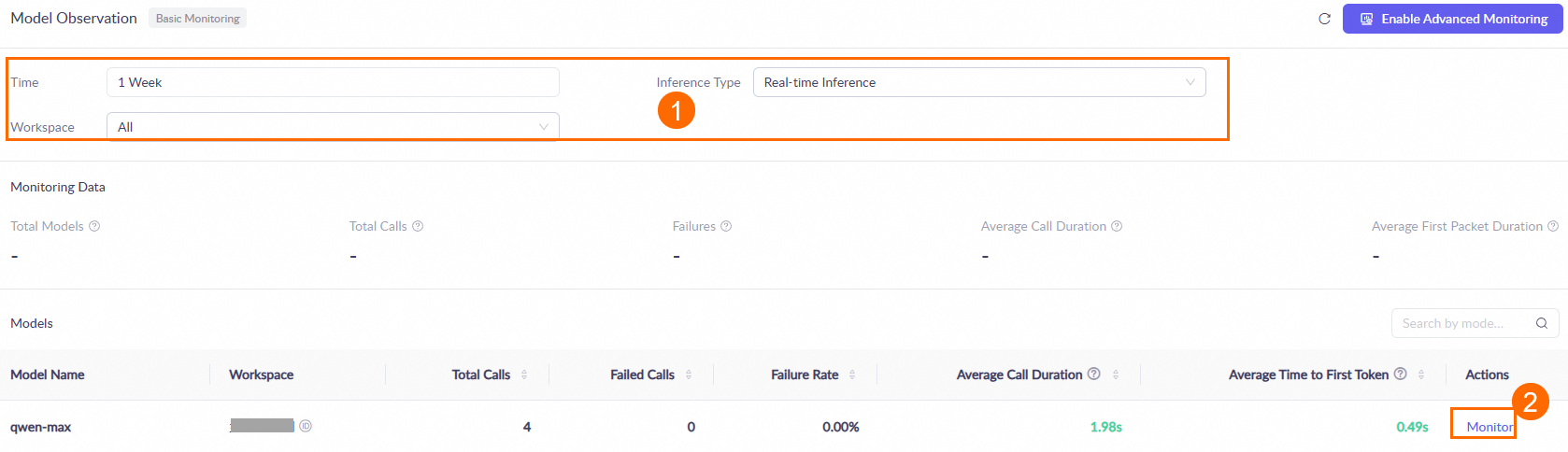
One hour after you call a model, go to the Monitoring (Singapore or Beijing) page. Set the query conditions, such as the time range and workspace. Then, in the Models area, find the target model and click Monitor in the Actions column to view the model's call statistics. For more information, see the Monitoring document.
Data is updated hourly. During peak periods, there may be an hour-level latency.
How do I avoid charges?
After your free quota is exhausted, charges are automatically deducted from your account balance. You can reduce the risk of unexpected charges in the following ways:
-
Delete created API keys: Go to the API key (Singapore) or API key (China (Beijing)) page in Alibaba Cloud Model Studio and delete your API keys. After an API key is deleted, it can no longer be used to call models, which prevents further invocation fees.
-
Set up a Spending Limit Alert: When your monthly spending exceeds the alert threshold, you receive a notification email.
From the Alert Product drop-down list, select a specific product, such as Model Studio Model Deployment, Model Studio Large Model Inference, or Model Studio Model Training. In the Alert Threshold field, enter an amount (for example,
0.01), and then click Add to create the alert rule.
Is it normal for large model invocations to be slow or delayed?
Yes. Response latency is affected by factors such as network conditions and model inference time, and is unrelated to whether you are using your free quota.
Invocation failures with remaining quota
Check if your Alibaba Cloud account has an overdue balance. If your account has an overdue balance, you cannot make invocations, even if a model still has a free quota.
Missing free quota and validity period
If the Free Quota column displays No free quota, or if the Free Quota area is not displayed, this may be caused by one of the following reasons:
-
The free quota has expired or been exhausted: The free quota is valid for 90 days, starting from the date you activate Alibaba Cloud Model Studio, the model is released, or your model request is approved (whichever is later). After the quota expires or is exhausted, it is no longer displayed, and continued model invocations will incur charges.
-
The model is in a region or service deployment scope that does not offer a free quota: Only models in the China (Beijing) region and models in the Singapore region are eligible for a free quota. Models in other regions or with different service deployment scopes do not have a free quota.
-
The model itself does not offer a free quota: Some models do not participate in the new user free quota program. To check whether a specific model is eligible for a free quota, go to the Model Square page in the console and open that model's details page. If the free quota area shows a remaining amount, the model is eligible (see "Check your remaining quota > Method 2: From the Model Square page"). If the details page does not display a free quota, the model is not eligible.
Are free quota and savings plans related?
No. The new user free quota is independent of savings plans. Purchasing a savings plan does not grant any additional free quota. Each model has its own independent free quota (typically 1,000,000 tokens), and this amount is not affected by any savings plan you purchase.